All updates
New
Fundraising pages for your supporters
Supporters and partners can run their own fundraising pages for your campaigns, alone or as a team, and every gift counts toward your goal.
Rohit Kaushik, Head of Engineering
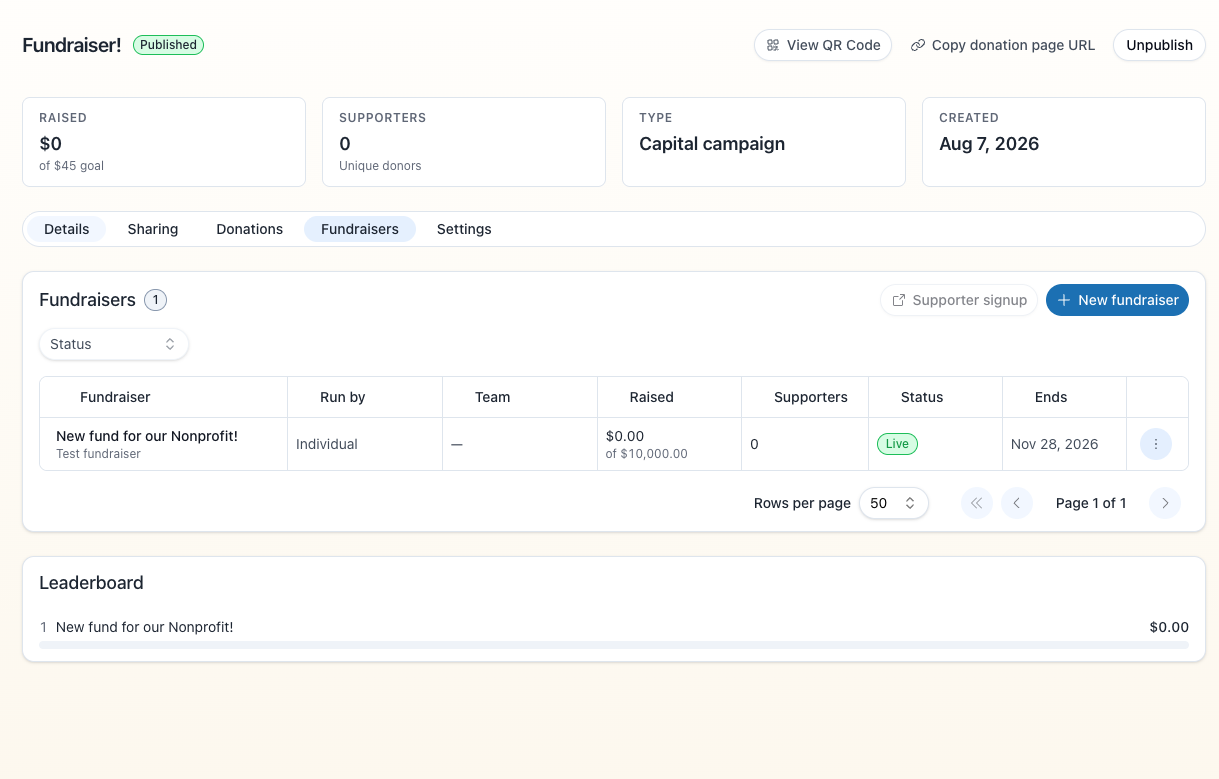
Your supporters can now raise money for you with their own fundraising pages: a birthday, a 5K, a memorial, a team at work. Each page has its own link, its own goal and your donation form, and every gift made through it counts toward your campaign.
- The Fundraisers tab. Every campaign has a Fundraisers tab. Create a page for a supporter or a partner, group pages into teams, review a page before it goes live, publish or unpublish it, and send the owner a link to edit it.
- Supporters start their own. Share a link to your campaign and supporters can start their own page, or start or join a team, without making an account. You choose, per campaign, who is allowed to start one.
- Owners edit their own page. The link you send an owner lets them change their story, goal, end date and cover photo, plus the parts of the look your brand settings allow. You decide which parts those are, for your whole organization.
- The public page. Each page shows a goal thermometer, a donor wall, a team leaderboard and your donation form. It stays open through the whole of its last day.
- Credit where it's due. A gift is credited to the page it came through, and donors can choose to hide their name from the donor wall.
