All updates
New
Program management is live
A new Programs page shows each program's budget, what's secured, what's projected and the gap left to raise.
Rohit Kaushik, Head of Engineering
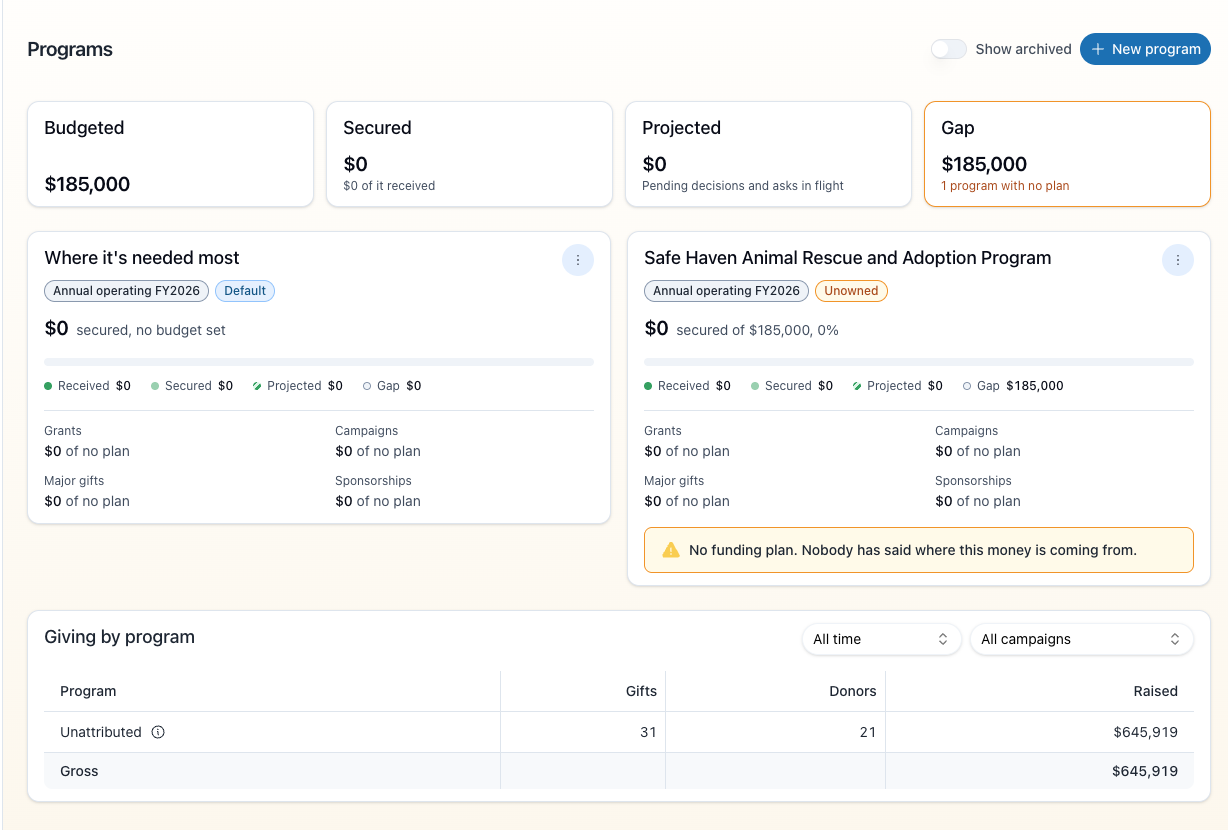
The Programs page shows whether the work you do is funded. For each program you can see the budget, how much is secured, how much is projected and the gap that's left, along with the grants, campaigns and gifts behind each number.
- Programs has its own place in the sidebar, after Campaigns. The page shows totals across all your programs and a card for each one. Open a program to set its budget type, its owner and a funding plan: how much you expect from grants, campaigns, major gifts and sponsorships.
- The page for each program: Each program's page lists where its money comes from: the grants, campaigns, pledges and open asks behind every figure. You can add or remove the campaigns that fund it.
- Annual budgets: An annual program counts only the gifts, recurring charges and grant awards from its fiscal year. A multi-year pledge counts the installments due that year, and a multi-year grant award is spread across the years it covers.
- Giving by program: A contact's Giving tab shows which programs their cash gifts went to, with the biggest share first.
